When your WordPress site goes down during an attack, it’s often because you didn’t have the right defenses in place beforehand. Zero-downtime website protection helps keep your site accessible while you contain an attack. At the same time, it protects sensitive data and reduces the risk of losing visibility in search engines.
We built WP Guard specifically around the security problems WordPress site owners run into most. The protection layers we’re covering here come from our actual experience.
In this article, we’ll share how zero downtime protection works and what happens in the midst of a live security incident. We’ll also look at what’s at stake when these protection layers aren’t in place. Read on to see how these protection layers help keep your WordPress website online when it’s under attack.
How Does Zero Downtime Website Protection Work?
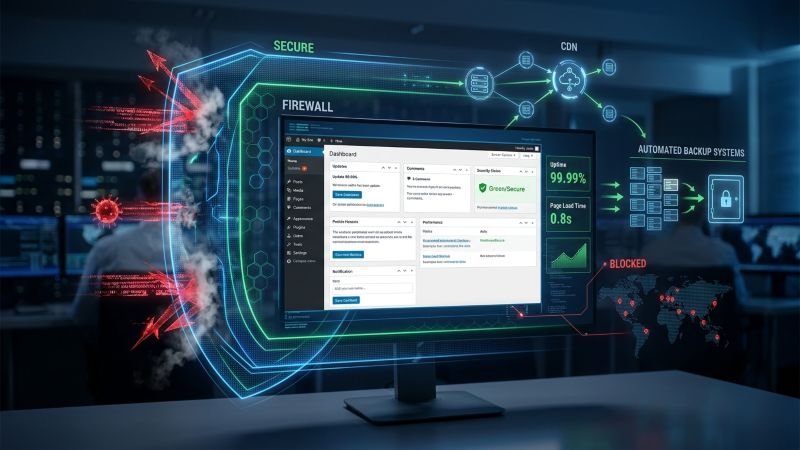
Zero-downtime website protection relies on several layers of website security that respond automatically when an attack occurs. They filter malicious traffic and keep your pages accessible during an attack. Plus, they help detect problems early, protect your data, and speed up recovery.
Here’s what each layer does when your WordPress site comes under threat:
- Edge Traffic Filtering: Web Application Firewalls sit between the internet and your server. They screen every incoming request.
- CDN Page Serving: When your origin server is under pressure, visitors still load your content from the nearest available location. Cached copies of your pages are stored across multiple server locations so there’s no disruption to the people browsing your site.
- Real-Time Alerts: WordPress uptime monitoring tools check your site at regular intervals for signs of trouble. Once something goes wrong, they can send an SMS or email alert so your team can respond before visitors start seeing errors.
- Automatic Backups: If an attack corrupts your files or database, you’re restoring from a recent clean copy rather than rebuilding from nothing. And it’s important to use offsite backups because they run on a schedule. This way, there’s always a recovery point ready when you need it.
- Fast Containment: A clear response plan helps your team act quickly as soon as a threat is detected. With alerts, backups, and firewall protection already in place, you can contain the issue before it causes further damage.
That’s how the zero downtime website protection works in practice. Each layer does its job, hands off to the next, and your site keeps running while the attack plays out.
What Actually Happens to Your Site During a Security Incident
When a security incident hits your site, different protection systems respond to contain the threat while keeping your site accessible. In the process, these systems block malicious traffic, keep your content accessible to legitimate visitors, and prevent further damage.
Let’s get into more detail about how they work when it’s attacked.
Web Application Firewall (WAF) Protection Layer
The WAF is the first thing an attacker runs into. It inspects every incoming request at the network edge, well before any of it reaches your WordPress installation. In particular, if requests match known attack patterns, they get dropped on the spot, but legitimate visitors don’t feel a thing.
During a large-scale DDoS attack (Distributed Denial-of-Service), this filtering prevents traffic spikes from consuming your server’s resources entirely. That’s how your site stays responsive while the flood of attacks is still coming in.
Content Delivery Network (CDN) Traffic Handling
When the WAF flags a serious threat and your origin server gets isolated for containment, the CDN steps in. It continues serving cached pages from multiple locations so visitors don’t hit an error message.
This system is more important for e-commerce sites because it allows your cached product pages to stay accessible during the incident. That way, your customers can still browse even when the server isn’t responding to new requests.
Caching Tip: Set appropriate cache rules for static assets like images, CSS, and JavaScript. Longer cache times can reduce requests to your origin server when traffic suddenly spikes.
Website Uptime Monitoring for Performance Optimization
While the WAF and CDN hold things together on the front end, uptime monitoring runs in the background. Paid tools check your WordPress site every 30 to 60 seconds. And the moment a problem is detected, SMS alerts go out to your IT team instantly.
It’s really important to detect downtime early so you can contain the incident before it causes further problems.
Access Gets Locked Down to Stop Escalation
The last thing you want during an active attack is an attacker finding an open door into wp-admin. To avoid this problem, you should use two-factor authentication. It’ll help prevent unauthorized logins even when credentials have been compromised elsewhere.
On top of that, if you have well-configured security plugins, they’ll monitor login attempts in real time and block suspicious activity automatically.
More importantly, you should limit access to your wp-admin page during an incident to stop attackers from gaining more control over your WordPress website. It’ll help contain the threat before it leads to a full site compromise (stolen passwords can surface long after a breach).
What Happens If This Protection Isn’t in Place
If your site doesn’t have the right protection in place, an attack can take it offline and disrupt normal operations. It can also affect revenue, website performance, and your search visibility even after your site is back online.
Site owners typically deal with the problems below when these layers aren’t in place:
- Search Ranking Loss: Googlebot regularly crawls your site to check its pages. If your server keeps returning errors for an extended period, Google may crawl your site less often and eventually remove affected pages from its index. It can reduce your visibility in search engines even after your site is back online.
- Shared Hosting Vulnerability: On a shared server, a DDoS attack aimed at one site can exhaust the CPU, memory, and bandwidth available to every other site on that same server. That’s how your site may go down even if you weren’t the target.
- No Backup Means Manual Rebuild: Recovering from an attack without automatic backups can mean paying for emergency malware removal. Depending on the extent of the damage, the cost can range from $300 to $6,500.
A reliable hosting provider with built-in redundancy can reduce the blast radius of any single server failure. And site owners who regularly review their security policies tend to recover their website faster when something does go wrong (with far less collateral damage).
How Prepared Is Your WordPress Site Right Now?
Zero downtime website protection helps keep your site running when an attack happens. A WAF, CDN, uptime monitoring, and automatic backups work together to contain threats, minimize downtime, and keep your site accessible.
If your WordPress site doesn’t have these protection measures in place, it’s exposed right now. WP Guard combines all of them into one managed plan, so you’re not piecing together tools when the next attack hits. Check out our free scanner to see where your site stands today.